As an Amazon Associate I earn from qualifying purchases. This page may contain affiliate links.
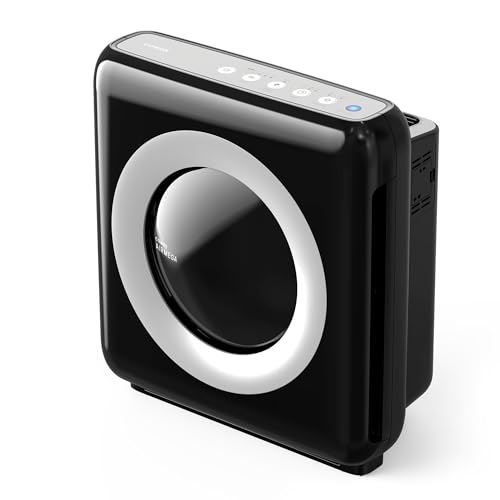
The levoit core 300p air purifier is a compact, true HEPA unit aimed at small to medium rooms, and this guide walks you through deciding whether it fits your space, setting it up correctly, placing it for best airflow, and maintaining it so it keeps working. By the end, you will know how to match its rated coverage to your room, how to read its airflow numbers, and how to estimate what replacement filters will add to your ownership costs over time.
What the Levoit Core 300P Is Designed to Do
The Core 300P is a small tower-style purifier built around a three-stage filtration path: a pre-filter for large particles, a true HEPA filter for fine particles, and an activated carbon layer aimed at some odors and gases. Levoit publishes its coverage as a room size range that is intended for bedrooms and similar spaces, and it positions the unit as a quiet option for overnight use. Manufacturers typically specify particle removal performance for the HEPA stage, usually stated as 99.97% at 0.3 microns, which is the standard benchmark for True HEPA filters.
Shopping for one? See our guide: Pure Air 3000 Air Purifier Review (2026): Pros, Cons & Who Should Buy.
Keep the scope of the claim in mind. A purifier like this reduces airborne particles such as dust, pollen, pet dander, and smoke particulates that pass through the filter. It does not remove all volatile organic compounds, and carbon media saturates over time. If you are dealing with a specific allergy or respiratory condition, treat the purifier as one tool alongside cleaning and source control, and consult a physician or allergist for medical decisions.
Step 1: Confirm the Room Size Match
Room size is the most common reason a purifier underperforms. Manufacturers usually list a maximum square footage based on a set number of air changes per hour, often around four or five for a standard rating. If the room is larger than the rated area, the unit still works, but it cycles air more slowly, and particle levels recover more slowly after cooking, vacuuming, or a door opening to the outdoors.
To check the match, measure length and width in feet, multiply to get square footage, and multiply by the ceiling height if you want a cubic-foot figure. Compare your square footage to the rated range on the box or the manufacturer’s spec sheet. If your room sits at the top of the range or above it, plan on running the unit on a higher fan speed more often. For a deeper walkthrough of this math, see our guide to Air Purifier Room Size Guide.
Quick sizing checklist
- Measure the room’s length and width in feet.
- Calculate square footage and compare it to the rated coverage.
- Note whether the room is open to others, which increases effective volume.
- Check ceiling height if it is unusually tall.
- Decide whether you need the unit for a bedroom, a home office, or a living area, since sleep-focused use favors low-noise operation.
Step 2: Understand the Airflow Numbers
Airflow is usually expressed as CADR, or Clean Air Delivery Rate, which measures how much filtered air a purifier delivers in cubic feet per minute for smoke, dust, and pollen. Higher CADR means faster cleaning, but the number only has meaning relative to room size. A common rule of thumb is to match CADR to about two-thirds of room area, though guidance varies by manufacturer and by particle type. Read our explainer on Air Purifier CADR Explained before comparing units side by side.
When you look at the Core 300P’s spec sheet, pay attention to whether the CADR figure is listed for all three particle types or only one. Some brands quote a single high number that reflects only the easiest particle to remove. Compare like with like.
Reading the spec sheet
| Spec | What it tells you | What to check |
|---|---|---|
| Rated room size | Coverage at standard air changes | Compare to your measured square footage |
| CADR (smoke, dust, pollen) | Speed of particle removal | Confirm all three values are listed |
| HEPA rating | Fine-particle capture efficiency | Look for True HEPA, not “HEPA-type” |
| Carbon weight | Capacity for odors and gases | Heavier carbon usually means longer useful life |
| Noise level (dB) | Sound on low and high speeds | Lower numbers suit bedroom use |
Step 3: Place the Unit for Maximum Airflow
Placement changes performance more than most buyers expect. A purifier pushed into a corner or hidden behind furniture pulls air from a small pocket and recirculates the same air. Give the unit open space on at least two sides, and keep it several inches away from walls so intake and exhaust are not blocked.
Think about where particles are generated and where you spend time. In a bedroom, a spot near the bed but not directly against the headboard usually works well. In a living room with a central sofa, a corner location that catches air moving toward the room’s main activity zone helps. Avoid placing it directly in front of a window with active drafts or next to a heating vent that blows air back at the intake.
Placement steps
- Choose a spot at least 12 inches from walls or furniture where possible.
- Keep the intake free of curtains, rugs, or stacked objects.
- Position the unit so its airflow crosses the room rather than blowing straight at one wall.
- Plug it into a dedicated outlet rather than a power strip shared with heaters.
- Run it on high for the first hour or so to clear the room, then drop to a lower setting.
Step 4: Set Up the Filters Correctly
Before first use, remove all packaging and protective films, and check that the pre-filter, HEPA filter, and carbon layer are seated fully. Many unit issues come from a filter sitting slightly out of position, which lets unfiltered air bypass the media. Close the cover or housing until it clicks or seals as the manual describes.
Record the date you install the filter. Filter life depends on how many hours you run the unit, the particle load in your home, and whether you have pets or smokers. Owners often report that the carbon layer saturates faster than the HEPA stage, especially in kitchens or homes with strong household odors, so track the two separately if you can.
Step 5: Maintain the Unit and Plan Filter Costs
Routine care is simple but important. Wipe the exterior with a dry or slightly damp cloth, vacuum the intake grille or pre-filter as the manual recommends, and avoid washing HEPA media unless the manufacturer explicitly allows it, since water can damage the fibers. Replacement timing is set by the manufacturer’s guidance and by how dirty your air is, not by a fixed calendar, so check the filter indicator if the unit has one.
For ownership planning, add up the cost of the replacement filter set and divide by the expected months of use to estimate your recurring spend. Compare that figure against other units in the same size class, since a purifier with a lower purchase cost can cost more over several years if its filters are expensive or short-lived. Our article on Air Purifier Maintenance covers cleaning schedules in more detail.
Common Mistakes to Avoid
- Undersizing for the room. Running a unit above its rated area on low speed rarely delivers the results people expect.
- Blocking the intake. Placing furniture or bedding against the grille cuts airflow sharply.
- Ignoring the pre-filter. A clogged pre-filter forces the HEPA stage to work harder and shortens its life.
- Running it only when you notice odors. Particles build up quietly, so consistent use matters more than occasional bursts.
- Expecting it to replace ventilation. Purifiers filter air but do not bring in fresh outdoor air, so pair them with source control and ventilation when cooking or cleaning.
Tips for Getting the Most From the Core 300P
Run the unit continuously on a low or auto setting rather than switching it on and off, since the air stays cleaner between events. Use a higher speed when cooking, vacuuming, or after someone smokes nearby. If you want objective feedback, pair the purifier with an air quality monitor so you can see particle levels change in real time. For a wider look at options, our Best Air Purifiers for Bedrooms roundup compares several bedroom-focused models, and our How to Select Air Purifier for Home: 7 Factors That Matter guide explains what to weigh before you buy.
Recommended gear
A few accessories can make the Core 300P easier to run and monitor. None of them are required, but each addresses a real limitation of running a single purifier.
- Replacement filter set for the Levoit Core 300P: Keeping a spare set on hand prevents gaps in filtration when the indicator signals a change. View on Amazon
- Indoor air quality monitor: A monitor shows particle levels so you can judge whether the purifier is keeping up in your room. View on Amazon
- Soft brush or crevice attachment for a vacuum: Helps clean the intake grille and pre-filter without pushing debris into the unit. View on Amazon
FAQ
What room size is the levoit core 300p air purifier best for?
Levoit lists the unit for small to medium rooms, with bedrooms being the typical target. Check the rated square footage on the packaging and compare it to your measured room size before buying.
Is the Core 300P a True HEPA purifier?
Levoit describes the unit as using a True HEPA filter, which the industry standard defines as capturing at least 99.97% of particles at 0.3 microns. Confirm the current spec sheet for the exact filter type on your model.
How often should I replace the filters?
Replacement depends on run time, particle load, and whether you have pets or smokers. Use the filter indicator if the unit has one, and inspect the pre-filter regularly for buildup.
Can I wash the HEPA filter?
Generally no. Washing can damage HEPA fibers and reduce performance. Follow the manufacturer’s instructions, and vacuum or replace the filter as directed.
Does the carbon layer remove all odors?
Carbon helps reduce some odors and gases, but it has limits and saturates over time. It does not remove every chemical or guarantee odor elimination, so source control still matters.
Is the unit quiet enough for a bedroom?
Owners often describe low-speed operation as quiet enough for sleep, though noise varies by setting. Check the decibel figures on the spec sheet and test on the lowest speed in your bedroom.
Can an air purifier replace ventilation?
No. A purifier cleans indoor air but does not bring in fresh outdoor air. Use exhaust fans and open windows when appropriate, and consult a professional for concerns about indoor air contaminants or health symptoms.
Conclusion
The levoit core 300p air purifier suits small to medium rooms when its rated coverage matches your space and placement gives the unit clear airflow. Confirm the CADR figures, set up the filters correctly, and track filter replacement so performance stays consistent. Factor the ongoing cost of replacement filters into your decision, and pair the unit with source control and ventilation for the best results.